库
-- 查看所有数据库
show databases;

-- 查看当前数据库
select database();

-- 查看所有数据库及其编码
SELECT
  SCHEMA_NAME AS '数据库名',
  DEFAULT_CHARACTER_SET_NAME AS '字符集',
  DEFAULT_COLLATION_NAME AS '排序规则'
FROM information_schema.SCHEMATA;

-- 查特定数据库及其编码
SELECT
  SCHEMA_NAME AS '数据库名',
  DEFAULT_CHARACTER_SET_NAME AS '字符集',
  DEFAULT_COLLATION_NAME AS '排序规则',
  SQL_PATH AS 'SQL路径'
FROM information_schema.SCHEMATA
WHERE SCHEMA_NAME = 'fancy';

-- 查看数据库大小
SELECT
  table_schema AS '数据库',
  ROUND(SUM(data_length + index_length) / 1024 / 1024, 2) AS '大小(MB)',
  ROUND(SUM(data_length) / 1024 / 1024, 2) AS '数据大小(MB)',
  ROUND(SUM(index_length) / 1024 / 1024, 2) AS '索引大小(MB)'
FROM information_schema.tables
WHERE table_schema = 'fancy'
GROUP BY table_schema;

-- 切换数据库
use database_name;

-- 创建数据库
create database database_name;
create database if not exists database_name;

-- 创建数据库并指定编码
create database database_name default character set utf8mb4 collate utf8mb4_general_ci;

-- 删除库
drop database database_name;
drop database if exists database_name;
表
-- 查看表
show tables;

-- 查看表结构
show columns from table_name;
-- 或
discribe table_name;
-- 或
desc table_name;

-- 创建表
create table dept(
dept_id int primary key auto_increment comment '部门ID',
dept_name varchar(100) not null  comment 'xxx',
dept_address varchar(100)  comment 'xxx',
dept_age int default 0  comment 'xxx'
)  comment '部门表';

-- 完整示例(数据库已继承字符集)
DROP TABLE IF EXISTS `category`;
CREATE TABLE `category` (
  `id` int PRIMARY KEY AUTO_INCREMENT COMMENT 'ID',
  `name` varchar(255) COMMENT '名称',
  `type` int COMMENT '类型:1-公开、2-私密',
  `parent_id` int COMMENT '父分类ID(null 为顶级分类)',
  `sort` int COMMENT '序号',
  `create_time` datetime COMMENT '创建时间',
  `update_time` datetime COMMENT '修改时间'
) AUTO_INCREMENT = 10001;

-- 删除表
drop table name;

-- 修改表名
alter table old_name rename to new_name;

--查询建表语句
show create table table_name;

--给表加注释
ALTER TABLE `your_table_name` COMMENT = 'your_table_comment';

-- 创建表后可以指定默认自增序号
-- 第一步:修改字段属性
ALTER TABLE `fancy`.`category`
MODIFY COLUMN `id` int NOT NULL AUTO_INCREMENT COMMENT 'ID' FIRST;

-- 第二步:设置自增起始值
ALTER TABLE `fancy`.`category` AUTO_INCREMENT = 10001;
列
-- 添加
alter table table_name add column_name datatype comment xxx;

-- 删除
alter table table_name drop column column_name

-- 修改列名
alter table table_name rename column old_name to new_name

-- 改变列数据类型
alter table table_name alter column column_name datatype
增
insert into table_name(col,xxx) values(col_value,xxx)删
delete from table_name where xxxx
-- 删除null字段
delete from table_name where xx is null
改
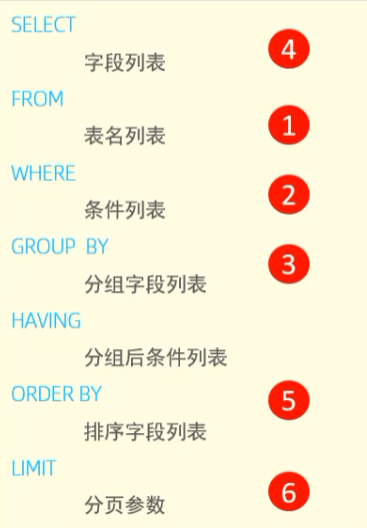
update table_name set xxx=xxx where xxx查
select xx
from table_name
where xxx
group by xxx
having xxx
order by xxx
limit xxx
where
操作符
| 操作符 | 作用 |
|---|---|
| = | 等于 |
| <> | 不等于 |
| != | 不等于 |
| < | 小于 |
| <= | 小于等于 |
| > | 大于 |
| >= | 大于等于 |
| between | 在指定的两个值之间 |
如:
select xxx
from xxx
where xxx between 5 and 10
多条件
有序多条件:使用and或or连接,两者同时使用时,or条件加上()
无序多条件:使用in指定条件值,也可使用not否定条件
通配符
提醒:不区分大小写
%:任何字符出现任意次数
where xxx like 'xxx%'(xxx开头)
where xxx like '%xxx'(xxx结尾)
where xxx like '%xxx%'(中间)
where xxx like 'x%x'(两头)_:匹配单个字符
where xxx like 'x_x'正则
where xxx regexp '1000|2000|3000'
where xxx regexp '[123]000'
where xxx regexp '[1-3]000'
where xxx regexp '.' 任意
where xxx regexp '^' 文本的开始
where xxx regexp '${content}#x27; 文本的结尾

如果需要区分大小写
where xxx regexp binary ''
order by
排序,默认升序asc(可省略),降序使用desc
select xx
from table_name
where xxx
order by xx desc
或者多条件
order by xx desc, xx asc
如果order by的不是数字,而是varchar类型,需要进行cast转换,也可以多条件
order by cast(xx as int) desc, cast(xx as int) desc
可多字段排序
select xx
from table_name
where xxx
order by xx desc,xx asc
limit
限制数据条数
select xx
from table_name
where xxx
limit 10,10limit限制从第N条开始的第M条数据,N从0开始计数。
注意:直接使用limit 10,10的形式分页效率不高,当类似limit 100000,10时,会先检索前100000条在取后10条
优化方式为使用where先过滤
select xx
from table_name
where xxx and id>xxx
limit 10
group by
分组
select xxx
from xxx
group by xxx
having xxxhaving用于过滤分组后的数据
字段拼接
select concat(name,'-',age) user from user;
 select concat(rtrim(name),'-',age) user from user;(去空格)

结果
+--------+
| user   |
+--------+
| tom-20 |
| tom-22 |
+--------+
聚合函数
| 函数 | 作用 |
|---|---|
| avg | 平均值 |
| count | 行数 |
| max | 最大值 |
| min | 最小值 |
| sum | 列数值总数 |
distinct去重
select distinct name from xxx用户管理
-- 查询用户
use mysql;
select * from user;

-- 创建用户
create user '用户名'@'主机名' identifled by '密码'

-- 修改用户密码
alter user '用户名'@'主机名' identifled with mysql_native_password by '密码'

-- 删除用户
drop user '用户名'@'主机名'

-- 可以使用%代代表访问任意主机
执行顺序